Showing posts with label Android. Show all posts

Wednesday, December 3, 2014

Blogaway Update: Moderate your comments

Today, we are releasing Blogaway v6.0.2 and Blogaway Pro v2.0.2 with some added features on comment moderations.


Android app on Google Play


You can now moderate your comments right from your mobile. You can view all your comments, including spam on your posts, and delete them, mark them as spam or approve them.

As of now, we are only showing the latest 20 comments on each post. We would be improving it later to be able to browse through all the comments that you have got.

Also, the comments are shown in a threaded view. And you can also view the profile pictures of your commenters. Hope you enjoy Blogaway even more.

Let us know if you love this feature, or have some feedback and suggestions. We will be happy to listen from you.


Thursday, July 10, 2014

New Compose UI

Blogging on the phone is not the same as on a desktop. Being creative while writing a post is a little tricky while you are on the move. Blogaway now has a new compose UI which tries to address this problem. However, we are still trying to improve and bring out new tools that help you write an awesome post, without worrying about the fact that you are on a mobile.
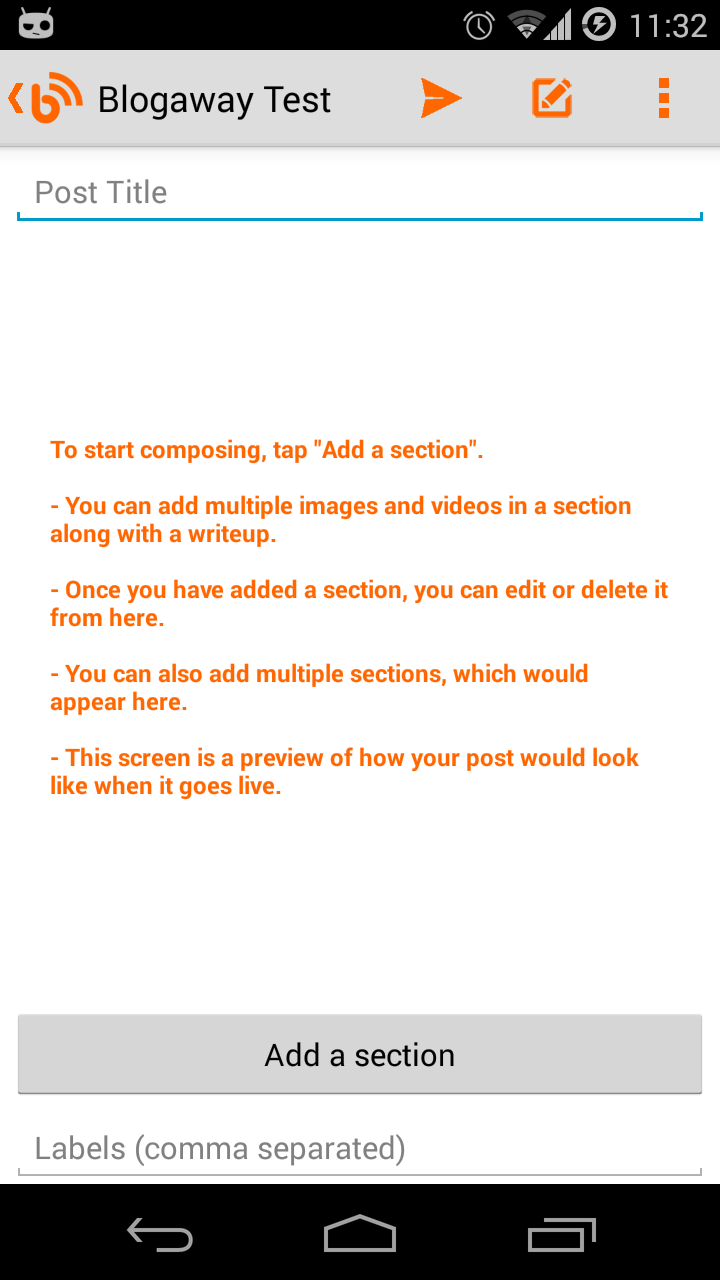
The new Compose UI

The first version of the new UI lets you be a little more creative than you were before. As compared to the previous versions, where your photos and videos could only go on the top of your posts, the new version is more flexible, allowing you to compose your post, with as many photos and videos you want, and most importantly, arrange your media as you like.

The new "Create Post" screen is simple to use. To start composing, tap on the "Add a section" button.

Composing a long post can be difficult on a mobile device, and you can very easily lose track of your content. So, with the new compose UI, we break up the process of composing into smaller tasks, or elements called "Sections"

Each section can have multiple images and videos, along with a write up. Within a section, you cannot arrange media as you like. All the attached media would still appear on the top of the text that you type in. But, the good thing is, you can add any number of sections, and arrange them instead. You can think of a section as a small paragraph of your post.

And when you come back to this screen after composing a section, this screen would be updated, and will show you a rough preview of what your content is going to look like.

And since each section is separate from each other, you can easily edit or delete specific sections.
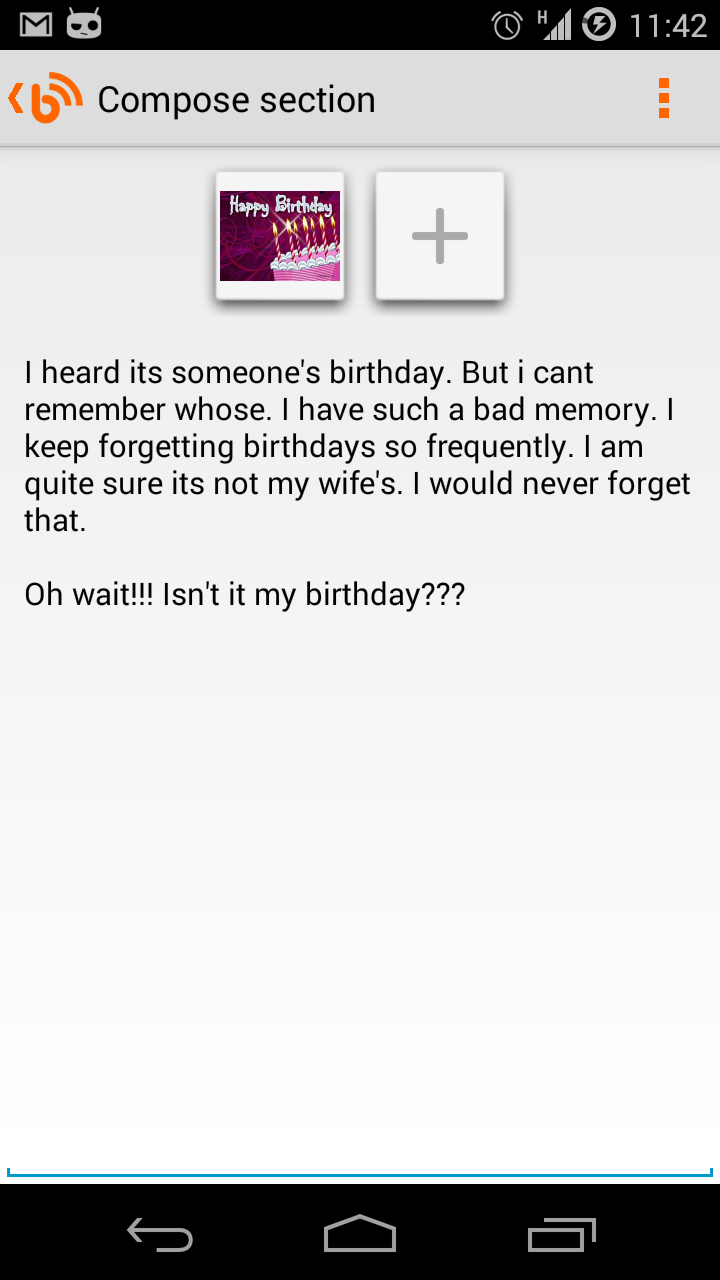
Composing a section

On the compose section screen, you have all the formatting options as before. They will be visible once you are in the compose mode and the keyboard is displayed.

Once you are done with a section, you can go back to have a preview of what the section looks like.


On the preview screen, there are two buttons for editing or deleting a section at the end of each section. You could have sections with only images, or only videos, or just plain old formatted text.
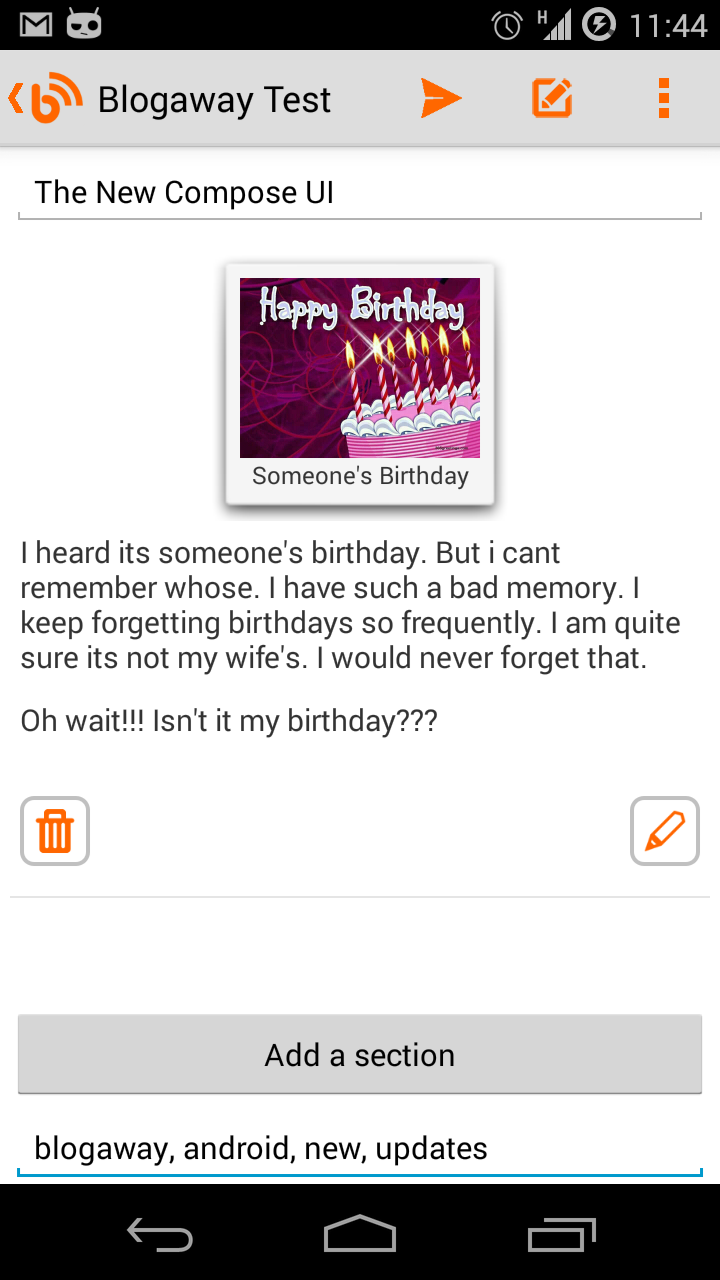


Sections preview
And once you are satisfied with the preview, you can hit the publish button to send away your awesome post.

And if you are not ready just yet, just press the back button, and this post would be auto-saved on your phone's drafts. When you find some more time to work on this post, go the the "Drafts" section, and tap on the one that you want to edit. You will again see this new compose UI, with everything that you were working on.


Note: While editing a post, you would still see the old compose UI. We haven't yet found out a good way to handle editing of posts that are already published (even the draft ones).

Let us know what you think, and do let us know if you have any suggestions for new features, improvements to the existing ones, or any other problems that you might be facing.

Keep blogging.

Monday, July 29, 2013

Blogaway 5.0.4 released

Blogaway 5.0.4 is now live on the Google Play Store. There was a minor crash in the settings screen which should now be fixed.

Other changes are mostly related to UI. Font colors, text sizes and dialogs were not consistent everywhere. This update has all those fixed. We wanted to ensure that the current users don't feel unsatisfied with the build with minor UI inconsistencies, and that one-off crash.

The next update for Blogaway would be in quite a few weeks. As we said before, we are working on a completely new set of features and improving the existing ones. We are confident that the next update will be the right step to take this application in the correct direction.

As always, keep sending in your comments and feedback, and we promise to attend/implement those in the upcoming versions.

Posted via Blogaway

Wednesday, July 24, 2013

Blogaway update coming soon

Blogaway would be getting a UI overhaul soon. And we are sure you would love the update. Although it might take a little longer, a few weeks is what you might have to wait.

We have a huge list of features, bugs and improvements on our agenda. But it would be great if we hear feedback and feature requests directly from the users. Do leave your comments if you have any.

We won't keep you waiting for long though.

Posted via Blogaway

Friday, March 19, 2010

Blogaway Downloads

Searching for Blogaway? Couldn't find it? Well, here are more options for you to download and use "Blogaway" rightway.


Blogway is now available on these stores:


1. Google Android Market             Search for "Blogaway"
2. AndAppStore                            Download
3. Slideme.org                              Download

We will be updating the same versions to all these stores as and when new releases are due. So, you don't have to worry and search and dig to find your copy of "Blogaway" if you fail to find it on the Android Market.

Happy Blogging,
Blogaway Team

Saturday, November 7, 2009

New Update Available

- Home screen changed.
- Adjusted some layouts for orientation change.

Future updates will mostly UI changes. I am trying hard to implement the photo upload feature. I need some more time.

Blogaway

Tuesday, November 3, 2009

Update - Blogaway 2.0

Blog-Away now uses the latest build of gData 1.39

- Upcoming features
1. Upload images
2. Comment on posts

Saturday, October 31, 2009

Blogaway 1.0 for Android Phones


A simple blogger client to read, post and manage your blogspot account feeds. A convenient way to keep you connected. Blogaway uses the GData blogger API to communicate with the blogger site. This initial version is still under active development.

More and more features will get added so that you can have a real Blogging experience.

Features for 1.0
- Multiple blog account support
- Multiple feeds under one account
- Create, publish or save as drafts
- Blogroll to read public Blogspot feeds
- Captcha unlock account
- Set default account to create new post, comments etc.
- Set default feed to post new posts
- Add labels/tags to your new posts


Future improvements
- View Comments
- Post Comments
- Add pictures/videos to posts
- Manage your accounts
- Delete feeds and accounts
- Support for other blog feeds other than Blogspot

I will be updating this application at regular intervals with more features. Please feel free to post your comments so tat I can improve and add more features in the future. Thanks.