Showing posts with label Blogger Client Android. Show all posts

Sunday, January 10, 2010

Blogaway Update

Hi All,


We are very sorry for so frequent updates for Blogaway. But there were a lot of bugs which we could find and had to fix them. We didn't find all these bugs at one time, and each of them was leading to Force closes.


Now, Blogaway is very stable, and thus we would not be updating it so frequently.


Thanks for your support and bug reports,

Blogaway Team


Wednesday, January 6, 2010

Latest update Issues

Blogaway v2.3(build 24) (Release date : 6th December 2009)

This release seems to have problems with Auto-Save drafts. We will be fixing this issue in the next update.

Thanks,
Blogaway Team

Saturday, December 5, 2009

Update - Image upload bug fix

Special thanks to Brian with whose effort I was able to figure out the issue. He is my savior. :)

People were getting force closes when they were trying to upload images of sizes more than 700Kb. This is now fixed.

Happy blogging.

Sunday, November 29, 2009

Update - Blogaway

This version is a minor update with mostly bug fixes.

People have been asking for delete functionality in the drafts/accounts/posts.

So, currently, I have enabled the deletetion of drafts and blog-roll.

Wednesday, November 25, 2009

Blogaway - Now supports Video upload

We are happy to announce that Blogaway now supports Video upload option with your blog posts. So, finally we got it working.

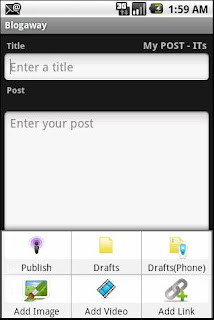
From the create post screen, you just have to say, Add Video. Select a video from your gallery, write a short post, and click on Publish from the menu. That's it.
However, there are some pre-requisites to be able to post blogs with pictures/videos. For picture uploading, you need to activate you Picasa account, and similarly, for uploading videos, you need to activate your Youtube account. Else you will get an error "Not found", as many people have been reporting. And also, right now, while creating a post, there is a limitation to what all you can attach to your post.

You can definitely attach any number of links as you want. But for pictures and videos, you can attach only a single picture or a single video. We are trying to get a solution for multiple pictures/video upload, but till then this the limitation for our application.

Hope you enjoy using Blogaway.

Monday, November 23, 2009

Blogaway - Now supports adding links

Hi People,
I know it's an important feature. But in the hurry, I forgot to include this in the initial releases. Now you can add links to your posts.

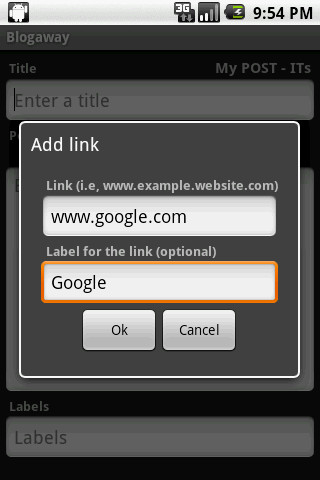
In the create post screen, you will see a new menu item called "Add Link". Clicking on it, you will see a dialog which has 2 text boxes. The first one is for the URL. (Please don't append http://, since blogaway will do it for you). In the label text box, enter a label for the link. This is optional. It no label is provided, the URL itself will be the label.

Apart from this feature, I have also enable auto-cap sentences in the Post Title, Post itself and in the Comments box, in the Create Comment screen.

Thursday, November 19, 2009

Blogaway v2.2 now supports Geo-Tagging

Its been quite some time since the last update. Been quite busy. Today, I have updated "Blogaway" to support Geo-Tagging your posts. While you are writing a small post from your phone, if you want to send/post your location information along with the post, you can simply turn-on the Automatic Geo-tagging feature by going to the "Settings" screen.


If this option is selected, every post that you publish will contain your location information, i,e the address from where you had published that post. The address will be a hyperlink. If you click on the hyperlink, you will be taken to Google Maps, and the address will be marked for you.


Clicking on the link will directly take you to that location on the Google Maps. If you need to turn off this feature, just go to settings, and uncheck "Geo-Tagging" and now you will not be sending your location information.

There is another option on the "Settings" screen called "Automatic Updates". This has not been implemented yet. So, it is disabled as of now.

Monday, November 9, 2009

Blogaway v2.2 now supports Image upload

The updated blogaway now supports creating new post with an image. The current version supports only 1 image per post. Here are the steps to follow to attach an image while creating a post.

1. From the "Create Post" screen, click on the "Add Image" option from the menu. You will be taken to the Gallery. After you select an image from your gallery, a thumbnail of the selected image will appear on the screen, just above the posts area.

2. Enter a title for the post, and content if you wish.

3. From the menu, select "Publish" to post.

You can also select the size of the image and the layout (center, left or right) by clicking on the thumbnail of the selected image.


You can upload any type of images. The application might crash if you try to select video files from your gallery. Video upload option is still not supported with this version.

Also, if you have created and post with an image, and saved it to the phone's drafts, re-opening that post later will not contain any information about the image. You have to re-attach the image again and then publish.